Payment Notifications Callbacks
OPay ensures that whenever there's a change in the status of any of your transactions, you are notified as soon as possible!
Set up CallBack Endpoint
After a given payment transaction has been issued by one of your clients through any of our payment channels, we will make sure that you are kept updated with the status of your transaction. OPay delivers an informative, and secure notification callback solution to keep our valued merchants informed once the status of their respective transactions have been updated.
All you need is to create your callback endpoint on your side to handle OPay's notification callback request. Creating an endpoint to receive callbacks on your application is as easy as creating a new page that accepts unauthenticated POST requests. The callback object is sent as a JSON object in the request body.

Note
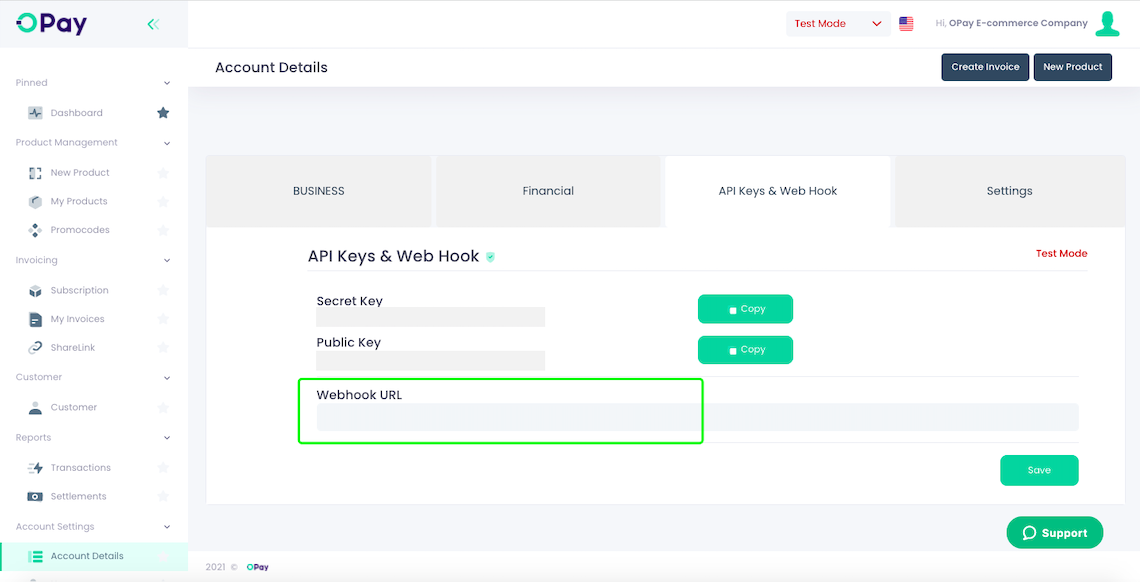
You must put your callback endpoint in the webhook URL field in your account settings as in the picture below:
Callback Cross Verification
Since anyone can get hold of your endpoint and attempt to send you phony event objects for malicious purposes (e.g. to see if they can mark their subscription to your product as renewed just in case you aren't running any verifications on the transaction reference), it is important to verify that callbacks originate from OPay.
You can do any or both of the below to verify callbacks from OPay
- Watch the IPs and accept callbacks only from our IPs.
- Validate the Signature as described in the section that follows.
Note
For more security you should check out our Payment Status API to make sure that the payment status changed and this callback request is not fake or for malicious intentions.
Handling Callbacks
Responding to a callback
You should respond to a callback with a 200 OK. We consider this an acknowledgement by your application. If your application responds with any status outside of the 2xx range, we will consider it unacknowledged and thus, continue to send it for 72 hours. You don't need to send a request body or some other parameter as it would be discarded - we only pay attention to the status code.
Structure of a callback object
A callback object is sent in JSON and similar to what you would get in response to a typical API request. Below is the body of a callback.
Example Response
 {
   "payload":{
      "amount":"49160",
      "channel":"Web",
      "country":"NG",
      "currency":"NGN",
      "displayedFailure":"",
      "fee":"737",
      "feeCurrency":"NGN",
      "instrumentType":"BankCard",
      "reference":"10023",
      "refunded":false,
      "status":"SUCCESS",
      "timestamp":"2022-05-07T06:20:46Z",
      "token":"220507145660712931829",
      "transactionId":"220507145660712931829",
      "updated_at":"2022-05-07T07:20:46Z"
   },
   "sha512":"9f605d69f04e94172875dc156537071cead060bbcaeaca94a7b8805af9f89611e2fdf6836713c9c90b028ca7e4470b1356e996975f2abc862315aaa9b7f2ae2d",
   "type":"transaction-status"
}
Response Parameters Description
| Parameter | type | Description | |
|---|---|---|---|
| payload | |||
| country | String | Transaction belongs country. | |
| fee | String | Transaction fee Amount in NGN. | |
| displayedFailure | String | Transaction reason for failure. | |
| reference | String | Partner transaction number. | |
| updated_at | String | Transaction update time. | |
| currency | String | Transaction currency. | |
| feeCurrency | String | Transaction Fee currency. | |
| refunded | String | Is the transaction a refund type (true false). | |
| timestamp | String | Transaction time. | |
| amount | String | Transaction Amount in NGN. | |
| transactionId | String | Opay transaction number. | |
| instrumentType | String | Pay method (BankCard ,BankTransfer...). | |
| status | String | Transaction status (successful failed). | |
| sha512 | String | Which is essentially a HMAC SHA3-512 signature of the callback payload. Signed using your Private Key.(signature method) | |
| type | String | transaction-status. | |